

16 Sep 2026


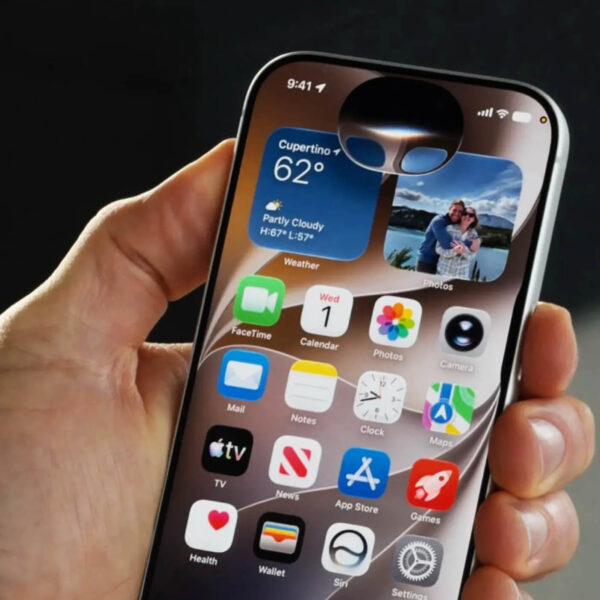
iOS 27 landed this week, just a few days after Apple unveiled the iPhone 18 Pro and iPhone Duo.
There’s obviously plenty to unpack, but two things in particular caught our attention. The first is what Apple is doing with Siri and AI. The second is the continued evolution of its native UI and development stack.
They seem like quite different stories, but there’s a connection between them. Both point towards apps becoming less self-contained, and more closely connected to the operating system and hardware around them.
For product teams, that’s probably more interesting than most of the individual features announced. Here are our main takeaways.
The rebuilt Siri is the obvious headline. What’s interesting isn’t necessarily how it compares with the latest models from OpenAI, Google or Anthropic. It’s the access it has to context.
Apple is allowing apps to expose both their content and the actions they can perform to the wider operating system. So rather than Siri only knowing what’s been said in a conversation, it can potentially understand information sitting across different apps and do something useful with it.
There are similarities here with the thinking behind MCP: instead of every system being a closed environment, capabilities are exposed in a way that other parts of the ecosystem can understand and use. In Apple’s case, that plumbing can feed Siri, Spotlight, Shortcuts and Widgets.
For us, the interesting bit is what that does to the idea of an app.
We’ve spent years designing apps as destinations. Download it, open it, navigate around it and eventually get to the thing you want to do. But increasingly, some of those interactions won’t need to happen inside the app at all.
A user could be looking at a web page and say, ‘Siri, add these ingredients to my groceries basket,’ letting the AI handle the data extraction behind the scenes and add items to the users basket seamlessly. They might say, ‘book a taxi to the hotel in the itinerary Dave just emailed me,’ trusting Siri to cross-reference their inbox and launch a ride app without being guided. Or they could simply ask to ‘play the podcast my brother sent on WhatsApp yesterday,’ bypassing the traditional navigation we’ve carefully designed entirely.
That doesn’t make the app redundant. But it does mean product teams need to start thinking about their product as more than the interface someone sees when they tap the icon.
There’s a useful lesson in Apple’s wider approach to AI here too. Craig Federighi and Greg Joswiak have been pretty clear that Apple isn’t particularly interested in adding a chatbot just so it can say it has one. The starting point is a feature or experience that could be better, and then working out whether AI can improve it.
Given how many businesses are currently trying to work backwards from “we need to do something with AI”, that’s probably not a bad principle to steal.
There are caveats though. The full Siri experience needs newer hardware and availability varies by geography, so an app can now behave quite differently depending on the device and market. That’s going to become another consideration for teams designing products at global scale.
The other thing worth paying attention to is what Apple is doing with Liquid Glass, SwiftUI and its new hardware.
Liquid Glass itself has already been refined, with Apple softening some of the choices that attracted criticism when it first appeared. That’s nothing particularly new. iOS 7 went through a similar process: Apple made a fairly dramatic change and then spent subsequent releases refining it.
What’s more interesting is how closely Apple is developing the interface, its native frameworks and the hardware together.
The iPhone Duo is a good example. Apps using standard SwiftUI components can pick up its new vertical toolbar layout when rebuilt against the iOS 27.1 SDK. That interface didn’t exist when those apps were originally designed, but because they’re using Apple’s native components, they can inherit the new behaviour without someone having to rethink the whole interface.
There’s something interesting about that happening now.
AI is making software quicker to produce and cross-platform frameworks continue to get better. You might expect the technology used to build an app to matter less as a result, but Apple keeps finding ways to make owning the whole stack valuable.
If you build close to the platform, you get more of that behaviour almost for free. The further you abstract yourself away from it, the more likely you are to have to recreate it yourself or wait for the tooling to catch up.
That’s not to say every app should be native. There are plenty of perfectly good reasons to use Flutter, React Native or other cross-platform approaches, and for many products the trade-off will still make complete sense. It’s just another reminder that there is a trade-off.
There’s clearly a lot to unpack in iOS 27, and some of its impact won’t become clear until we’ve seen how people actually use it. But for product teams, there are a few things we’d be thinking about now.
Start thinking beyond the app. Consider which parts of your product genuinely need someone to open it, and which information or actions could be useful elsewhere across iOS. The app is increasingly just one way into the product.
Be deliberate about AI. Apple’s approach is a useful counterpoint to the rush to add AI everywhere. Start with the experience you want to improve, not the technology you want to use.
Think carefully about how you build. Cross-platform development still makes sense for plenty of products, but Apple is making the benefits of building closer to its platform harder to ignore. That trade-off is worth revisiting rather than treating as a decision that’s already been made.
The individual features in iOS 27 will come and go. What’s more interesting is the direction of travel: apps are becoming more connected to the operating system around them, while Apple continues to make that connection more valuable.
For product teams, that’s the bit worth paying attention to.